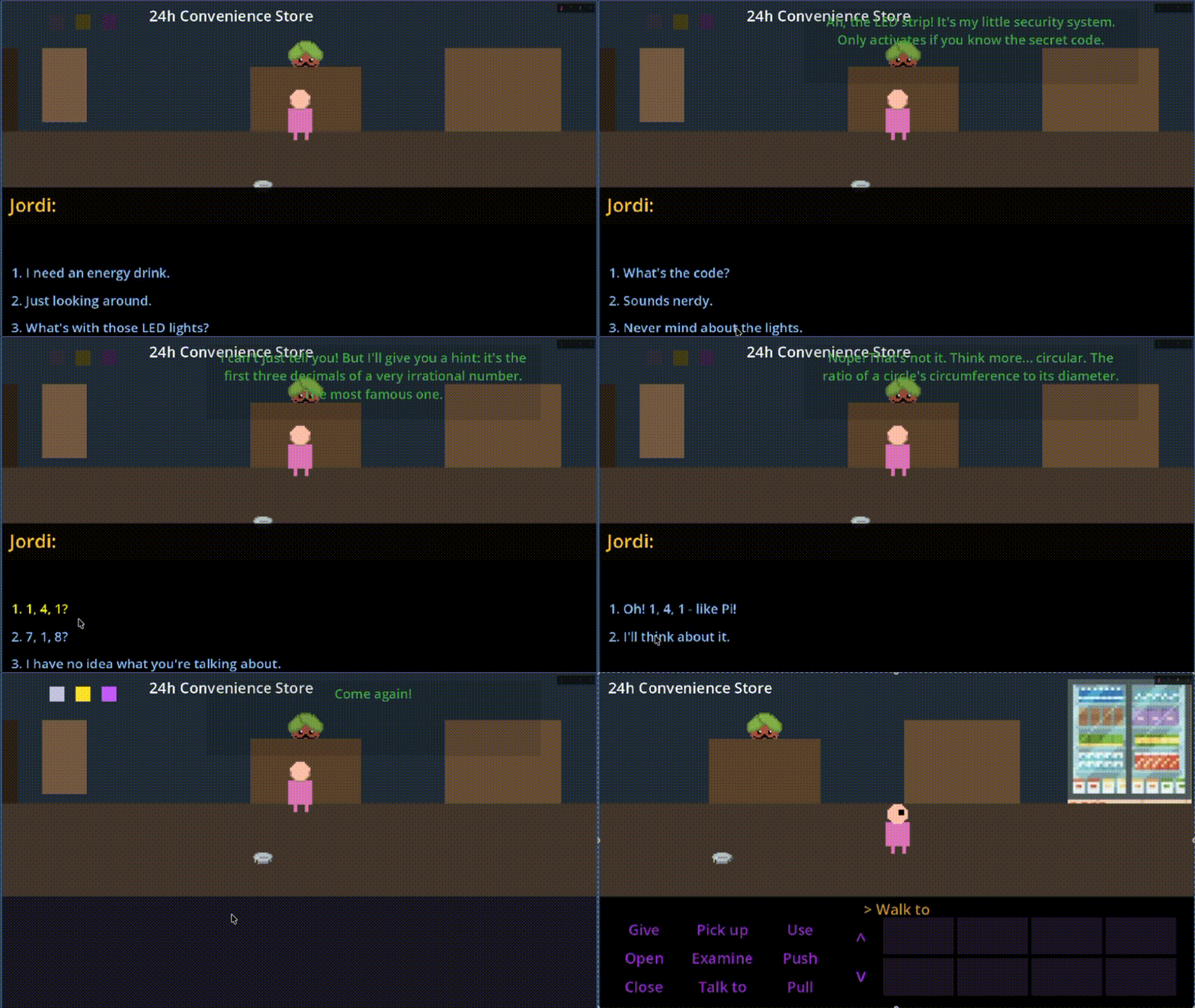
Today was about building tools that build the game faster. Instead of writing content, I spent the day creating and refining a custom dialogue editor plugin for Godot. The result? What used to take hours of JSON editing now takes minutes of visual node placement.
Why Build a Custom Dialogue Editor?
Adventure games live and die by their dialogue. Pulp Friction has dozens of characters, hundreds of conversation branches, and thousands of lines. Managing all of this in raw JSON files was becoming unsustainable:
- Hard to visualize conversation flow
- Easy to break connections between nodes
- No way to see the “big picture” of a conversation
- Tedious to test changes
I needed something visual. Something that would let me see the conversation as a graph, edit nodes with immediate feedback, and export clean JSON that the game engine already understands.
The Dialogue Editor Plugin
The plugin adds a new panel to the Godot editor—a full node-based dialogue editor that feels native to the engine.
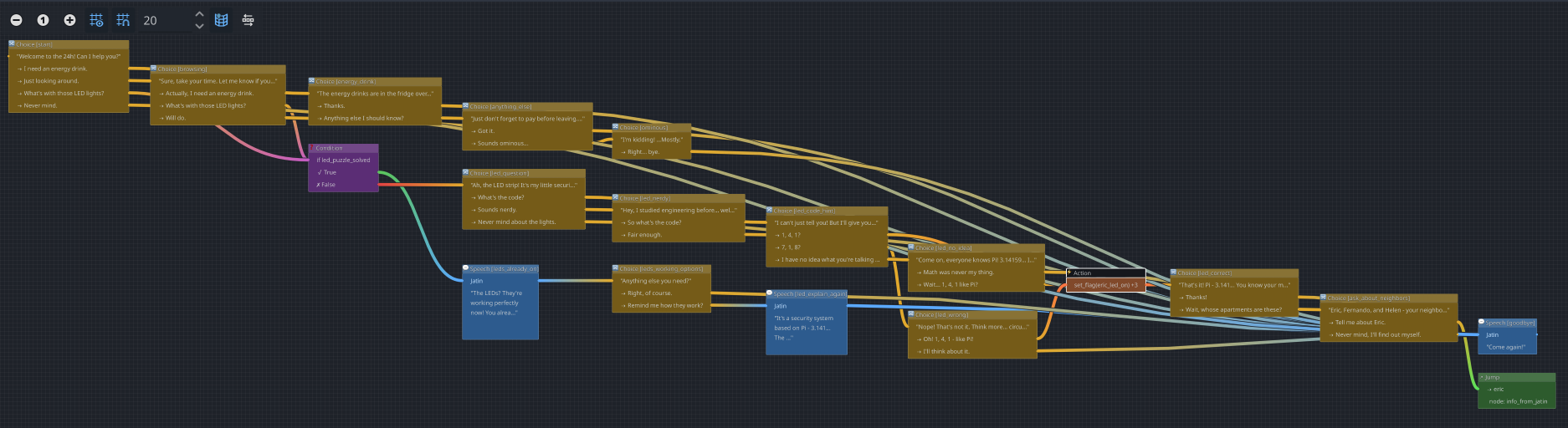
That’s Jatin’s entire conversation tree. Every branch, every choice, every possible path the player can take—all visible at once.
Node Types
The system supports several node types, each color-coded and serving a specific purpose:
Speech Nodes (Blue) — The bread and butter. An NPC says something, with properties for speaker, text, duration, and whether it blocks player input.
Choice Nodes (Yellow/Gold) — When the player needs to decide. Jatin asks a question, and the player picks from multiple responses. Each choice leads to a different branch.
Condition Nodes (Purple) — Logic gates that check game state. In the screenshot, you can see one checking led_puzzle_solved—if true, the conversation skips the puzzle explanation entirely.
Action Nodes (Orange) — The magic glue. These trigger game events directly from dialogue: set flags, give items, activate puzzle solutions. More on this below.
The Pi Puzzle: Dialogue-Driven Problem Solving
Here’s where it gets interesting. The convenience store has an LED puzzle—three lights that need to be activated in the right pattern. Originally, I planned for Jordi to solve this by visiting his neighbors (Eric, Fernando, Helen) and convincing each one to help.
But with the dialogue system in place, I realized: what if the puzzle could be solved through conversation alone?
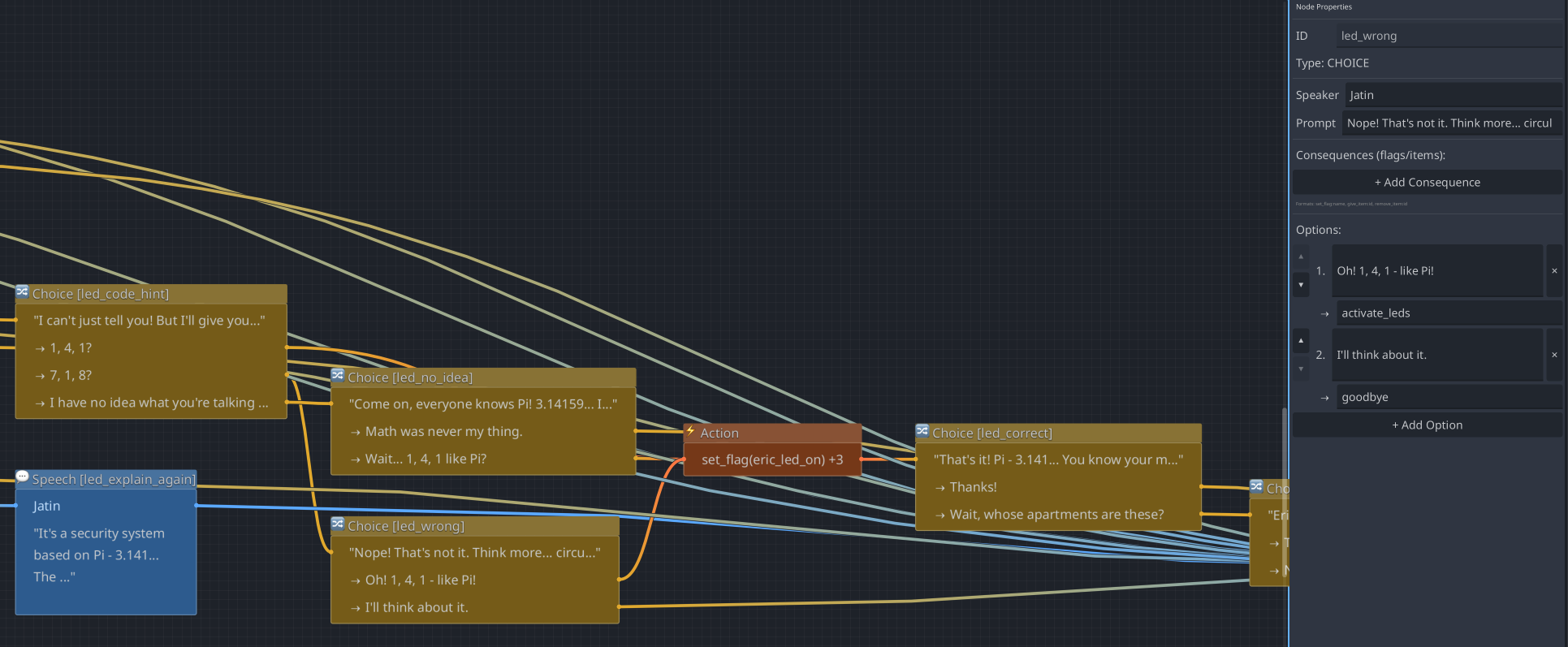
Enter Jatin’s riddle. When Jordi asks about the LED lights, Jatin reveals they’re part of a security system based on Pi—3.14159. The code? Hidden in the digits themselves.
The conversation branches:
- “I can’t just tell you! But I’ll give you…” — Jatin offers cryptic hints
- “1, 4, 1?” / “7, 1, 8?” / “I have no idea…” — Player guesses
- “Come on, everyone knows Pi! 3.14159…” — Jatin pushes toward the answer
- “Wait… 1, 4, 1 like Pi?” — The eureka moment
When the player finally answers correctly, an Action node fires: set_flag(eric_led_on) +3. This single node activates all three LEDs simultaneously, solving the puzzle through pure dialogue.
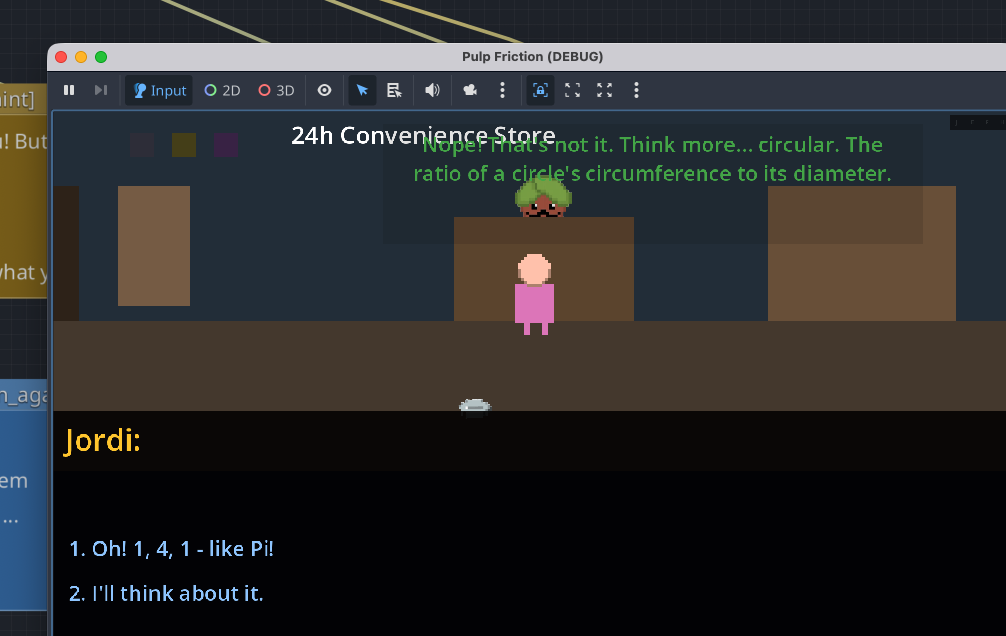
“Think more… circular. The ratio of a circle’s circumference to its diameter.”
The player sees Jatin’s hint, considers the options, and—if they know their math—realizes the answer has been staring at them all along. No inventory items needed. No pixel hunting. Just a conversation that rewards paying attention.
Why This Matters for Game Design
This approach opens up puzzle design possibilities:
- Multiple solution paths — Players can solve the LED puzzle by talking to neighbors OR by cracking Jatin’s riddle
- Rewards knowledge — Players who recognize Pi get a shortcut
- Natural difficulty scaling — Stuck? Visit the neighbors for more direct hints
- Replayability — Different paths through the same content
And from a development perspective: I designed this entire puzzle branch in the visual editor in about 30 minutes. The branching, the conditions, the action triggers—all connected visually without writing a single line of code.
The Blocking System
One subtle but crucial feature: blocking vs non-blocking dialogue.
When Jatin explains the LED system for the first time, the player should be locked in place—this is important information. But when he says “Come again!” as you leave? That’s a throwaway line. The player is already walking out.
Each node has a blocking property:
- Blocking (default): Player frozen until speech ends
- Non-blocking: Speech bubble appears, player keeps moving
This distinction sounds minor, but it completely changes how conversations feel. Important story beats demand attention. Casual remarks don’t interrupt flow.
Visual Graph Editing
The heart of the plugin is the visual graph. Each node is a draggable box, connections are visible lines, and the whole conversation is laid out spatially. I can:
- Drag nodes to organize the flow visually
- Connect outputs to inputs by drawing lines
- See the inspector panel for detailed node properties
- Search across all dialogue text with Cmd+F
- Undo/redo every change
- Switch to JSON view for power editing
The Node Properties panel shows everything: ID, type, speaker, prompt text, consequences, and branching options. No more hunting through JSON to find the right field.
Connecting Systems: Dialogue Solves Puzzles
The real power is integration. That single Action node—set_flag(eric_led_on) +3—connects the dialogue system to the puzzle system. When it fires:
- The
eric_led_onflag is set to true - The
+3triggers two more flags (Fernando and Helen LEDs) - The puzzle system detects all three flags
- The exit unlocks
All from a conversation. The player talked their way to victory.
This pattern scales. Future puzzles can be solved through clever dialogue, item combinations, or environmental interaction—whatever fits the narrative best.
What’s Next: The Scene Builder Plugin
With dialogue and puzzles covered, the next bottleneck is scene creation. Setting up a new room still requires manual scene files, hotspot placement, and navigation polygon configuration.
The vision: a Scene Builder Plugin that lets me design rooms visually, with hotspots that auto-connect to dialogue files and puzzle dependencies that visualize across the whole game.
Each plugin compounds the productivity of the next. Today it’s dialogue. Tomorrow it’s scenes. Eventually, adding a new room with full dialogue and puzzle integration should take minutes, not hours.
For Developers: Technical Notes
For those curious about the implementation:
- Built as a Godot
@toolplugin usingEditorPluginandGraphEdit - Custom
GraphNodesubclasses for each node type - Dialogue stored as JSON with nodes, connections, and metadata
- Runtime
DialogueManagerautoload handles playback and state - Action nodes parse a simple DSL:
set_flag(name),give_item(id), etc. - Full undo/redo via Godot’s
UndoRedosystem
The plugin code lives in addons/dialogue_editor/ for the curious.
Lines of dialogue created today: 0 (but the tools to create thousands)
Puzzles now solvable through conversation: 1 (the Pi puzzle)
Hours saved by future content creation: Many
Sometimes the best progress isn’t content—it’s building the tools that make content creation feel effortless. And sometimes, the best puzzles aren’t about finding items—they’re about paying attention to what people tell you.
Comments
Have thoughts or questions? Join the discussion below!